 MistBar
Feature
A Clipboard Manager in Your Menu Bar
Everything you've copied, a keystroke away — text, images, and files. Updated August 2026.
macOS only remembers the last thing you copied, which means the moment you copy something new, the useful thing from two minutes ago is gone. A clipboard manager fixes that: it keeps a running history of what you've copied so you can reach back for any of it. MistBar keeps that history in your menu bar, a keystroke away, and folds it into a full menu-bar app rather than being one more thing to install. Full disclosure: I make MistBar, and I'll point you at the free option when it's the better fit.
What it does
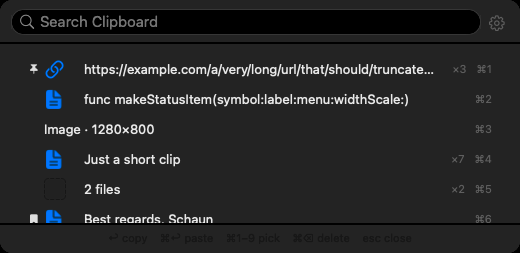
Everything you've copied, a keystroke away. Open the panel and scroll back through your history, or just start typing to search it. Some highlights:
- Pinned snippets — pin the things you paste over and over (an address, a signature, a code block) so they're always at the top.
- Drag straight into any app — grab a clip and drop it right where you need it, no paste-and-reformat dance.
- Images and files too — not just text; screenshots and files you've copied live here as well.
- A storage cap you control — set how much history to keep so it never grows unbounded.
- Quick search across everything — one field for your clipboard, apps, folders, and even the icons you've hidden.
Where the numbers stay: on your Mac
Best for: anyone who wants copy history without sending it anywhere.Your clipboard is some of the most sensitive data on your machine — passwords, tokens, half-written messages. MistBar keeps its history on your Mac. There's no account, nothing is uploaded, and nothing syncs to a server you don't control. What you copy stays with you.
How it compares to Maccy and Paste
| MistBar | Maccy | Paste | |
|---|---|---|---|
| Price | $9.99 once | Free | Subscription |
| Lives in the menu bar | Yes | Yes | Yes |
| Text, images & files | Yes | Yes | Yes |
| Pinned snippets | Yes | Yes | Yes |
| Also declutters your menu bar | Yes | — | — |
| Launcher, notes, mail, AI usage | Yes | — | — |
Straight talk: if you just want a dedicated clipboard manager and want it free, get Maccy — it's open source, fast, and does one job really well. If you want cross-device sync and don't mind a subscription, Paste is polished. MistBar is for the person who wants the clipboard history and a decluttered menu bar, with a launcher, notes, mail, and AI-usage readout in the same native app — one tool instead of four.
It's part of the whole app
The clipboard manager isn't a bolt-on. MistBar's main job is to declutter your menu bar — hide the icons you never click, reveal them on hover or a hotkey, all without Screen Recording permission. The clipboard rides alongside an app launcher, notes, folders, all your mail in one list, text expansion, and a live Claude, Codex & Copilot usage readout. One-time $9.99 (launch price), up to three Macs, no subscription, macOS 26+.
New to MistBar? See what it does, or how it stacks up in the menu-bar app roundup.
Never lose a copy again
A searchable clipboard history in the menu bar — pinned snippets, images and files, drag into any app — plus a decluttered menu bar, launcher, notes, and mail. One-time $9.99, up to 3 Macs, 14-day refund.
Get MistBar