 MistBar
Feature
Your AI Usage, in the Menu Bar
Live Claude Code, Codex, and Copilot usage a glance away - no terminal, no dashboard. Updated August 2026.
If you spend your day in Claude Code, Codex, or Copilot, you've probably wondered mid-session how much of your limit is left - and had to stop and check a dashboard or run a command to find out. MistBar keeps that number in your menu bar. Your current usage and reset time sit up top, and one click opens a full history. For Claude and Codex it reads what's already on your Mac, so there's nothing to set up. Full disclosure: I make MistBar, and this is one of its features, not a standalone app.
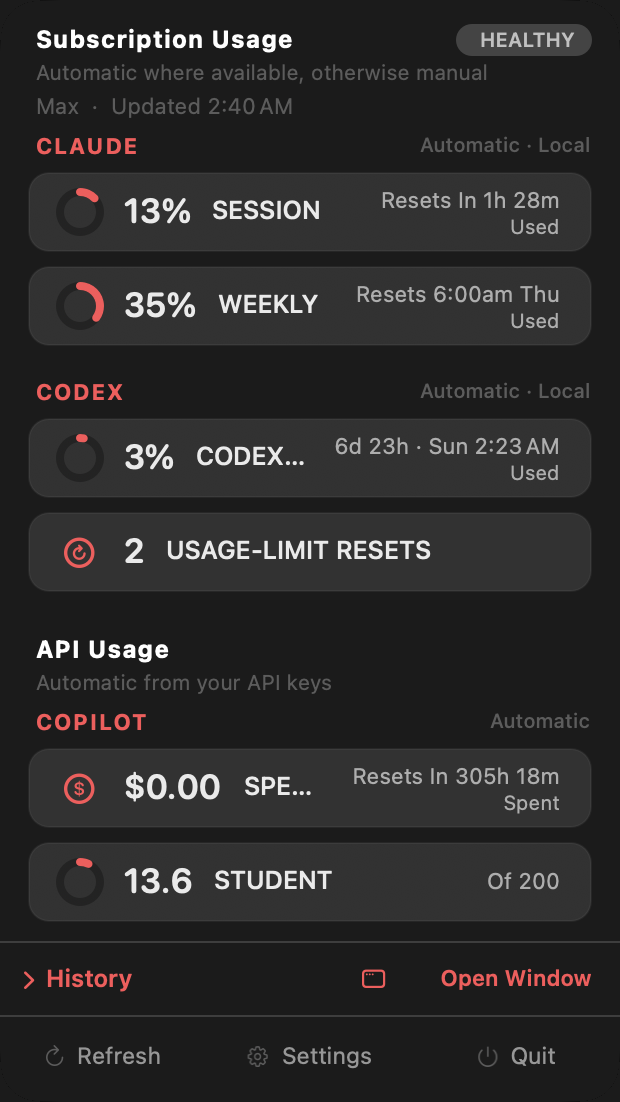
What it shows
At a glance in the menu bar, MistBar keeps your current usage and reset time for the providers you care about. Open the dropdown and it expands into a full history: a weekly trend, a token breakdown, and by-model totals, across 24 hours, 2 days, 7 days, or 30. You pick which providers ride in the menu bar itself and which stay in the dropdown, and you can tune each one's badge, icon, and color so the bar reads the way you want.
Where the numbers come from
Best for: anyone who wants the number without handing over access.For Claude and Codex, MistBar just reads the usage data those tools already keep on your Mac - so there's nothing to configure, no login, and it works the moment you turn the feature on. For Copilot, it connects to Copilot's usage API. Either way, MistBar reads usage totals, not your prompts, conversations, or code. Nothing is uploaded, there's no account with me, and everything stays on your machine.
How it compares to a CLI or a single-purpose tracker
| MistBar | ccusage (CLI) | Single-purpose tracker | |
|---|---|---|---|
| Lives in | Menu bar + history window | Terminal | Menu bar |
| Providers | Claude, Codex, Copilot | Claude Code | Varies |
| Full history & trend | Yes | Text output | Sometimes |
| Also declutters your menu bar | Yes | - | - |
| Clipboard, launcher, notes, mail | Yes | - | - |
| Price | $9.99 once | Free | Often free |
Straight talk: if you live in the terminal and just want a number on demand, a free CLI like ccusage is great, and if all you want is a tiny usage readout, a free single-purpose menu-bar tracker will do the job. MistBar is for the person who wants that readout always visible and wants their menu bar decluttered, with a clipboard manager, launcher, notes, and mail in the same native app - one tool instead of a CLI plus a hider plus three utilities.
It's part of the whole app
The usage tracker isn't a bolt-on. MistBar's main job is to declutter your menu bar - hide the icons you never click and reveal them on hover or a hotkey, with no Screen Recording needed on a MacBook with a notch. The AI-usage readout rides alongside a clipboard manager, mail, an app launcher, notes, folders, and text expansion. One-time $9.99 (launch price), up to three Macs, no subscription, macOS 14 or later.
New to MistBar? See what it does, or how it stacks up in the menu-bar app roundup.
Keep an eye on your AI usage
Live Claude, Codex, and Copilot usage in the menu bar - plus a clipboard manager, launcher, notes, and a decluttered menu bar. One-time $9.99, up to 3 Macs, 14-day refund.
Get MistBar