 MistBar
Feature
Gmail in Your Menu Bar
Your unread count plus quick compose, reply, and undo-send - no client to open. Updated August 2026.
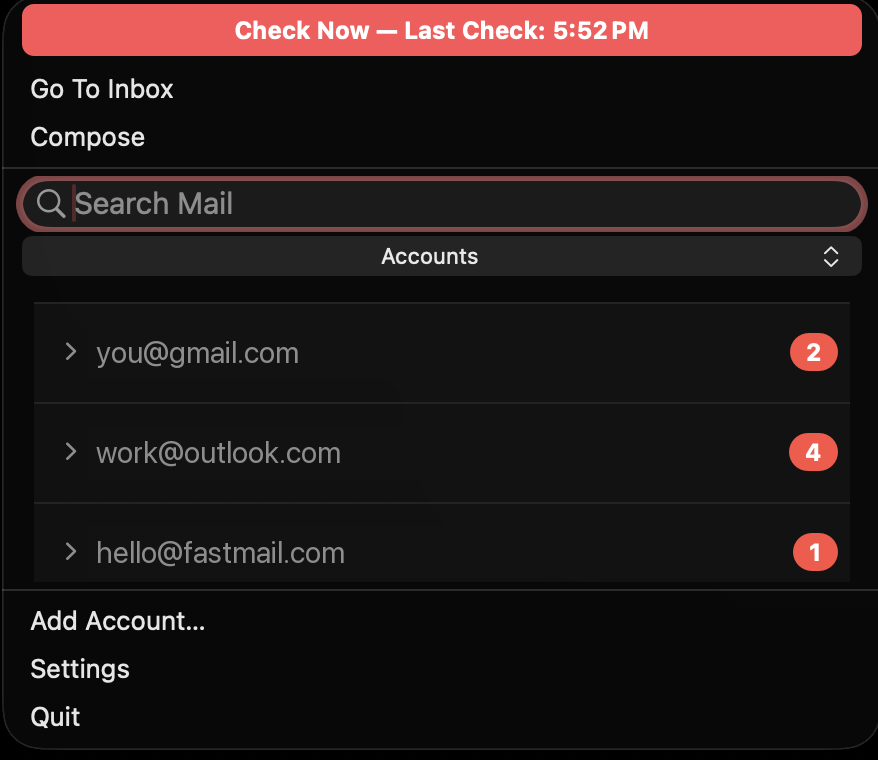
You don't need a whole email app open all day just to know something landed. MistBar keeps your Gmail in the menu bar - the unread count sits up top, and one click drops down your inbox where you can write, reply, and undo a send without opening a client or a browser tab. And it isn't only Gmail: Outlook, iCloud, and Fastmail share the same hub. Full disclosure: I make MistBar, and this is one of its features, not a standalone app.
What it does
Your unread count lives in the menu bar, so a glance tells you whether anything needs you. Open the dropdown and every account is grouped on its own, each with its own count. From there you can compose a new message, reply to what's in front of you, and undo a send if you catch a typo a second too late - all without leaving the bar. Add as many accounts as you keep.
Every inbox in one place, straight to the source
Best for: anyone juggling a few accounts who just wants to stay on top of them.Gmail, Outlook, iCloud, and Fastmail sit together in one hub instead of four apps or four browser tabs. And each account talks straight to its own provider - your mail never passes through any server of mine, there's no MistBar account, and your credentials stay on your Mac. It's the convenience of one place to look, without handing your mail to a middleman.
How it compares to a full client or a browser tab
| MistBar | Mimestream | Gmail in the browser | |
|---|---|---|---|
| Lives in | Menu bar | Full app window | A browser tab |
| Providers | Gmail, Outlook, iCloud, Fastmail | Gmail & Workspace | Gmail |
| Unread at a glance | In the menu bar | Dock / app | Only if the tab's open |
| Compose, reply, undo send | Yes | Yes, full client | Yes, in the tab |
| Talks straight to your provider | Yes | Yes | Yes |
| Also declutters your menu bar | Yes | - | - |
| Clipboard, launcher, notes, usage | Yes | - | - |
| Price | $9.99 once | Free tier + subscription | Free |
Straight talk: if you want a real Gmail client with threading, labels, and deep search, Mimestream is excellent and the browser is free - MistBar isn't trying to replace them. MistBar is the menu-bar companion: it's for the person who wants to see what's unread and fire off a quick reply without a client eating a window, in the same app that declutters the menu bar and keeps a clipboard manager, notes, and AI usage a keystroke away.
It's part of the whole app
Mail isn't a bolt-on. MistBar's main job is to declutter your menu bar - hide the icons you never click and reveal them on hover or a hotkey, with no Screen Recording needed on a MacBook with a notch. The inbox rides alongside a clipboard manager, notes, an app launcher, folders, text expansion, and a live AI-usage readout. One-time $9.99 (launch price), up to three Macs, no subscription, macOS 14 or later.
New to MistBar? See what it does, or how it stacks up in the menu-bar app roundup.
Keep your inbox in reach
Your Gmail unread count plus quick compose, reply, and undo-send in the menu bar - across every account, alongside a clipboard manager, notes, and a decluttered menu bar. One-time $9.99, up to 3 Macs, 14-day refund.
Get MistBar